
📘 Have you ever seen a device marked as “Not Compliant” in Microsoft Intune — even though everything seems configured correctly?
This frustrating scenario often stems from a mismatch between the enrolled user and the current primary user of the device.
Root Cause: A User-Based Compliance Conflict
When a device is enrolled in Intune, it becomes tightly bound to the user who performed the enrollment. If that user changes — and the previous one isn’t properly removed — Intune may continue to validate compliance based on the original user, not the current one.
This creates misleading results:
✅ The new primary user appears compliant.
❌ The original enrolling user is flagged as non-compliant, especially for policies like BitLocker encryption, password requirements, or antivirus settings.
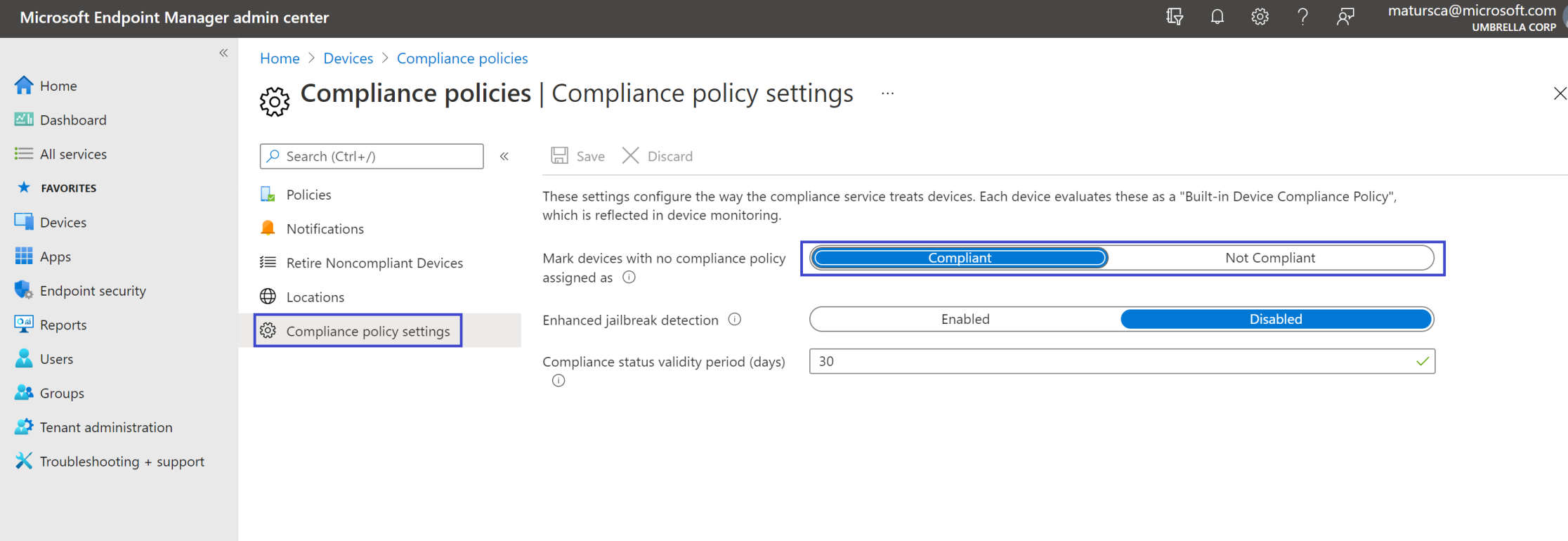
🕒 In the example shown, Compliance status validity is set to 30 days, meaning the device is considered compliant for that period — but the issue still persists if linked to an outdated user profile.
How to Fix the Compliance Conflict
To restore accurate compliance reporting, follow these steps:
Remove the old user association from the device in Intune.
Assign the correct primary user using the Intune portal.
Force a device sync or manually trigger a compliance check.
✅ Workaround Summary
Even when the current user is compliant, the system may still assess compliance under the previous user account. This happens because Intune evaluates compliance per user, not just per device.
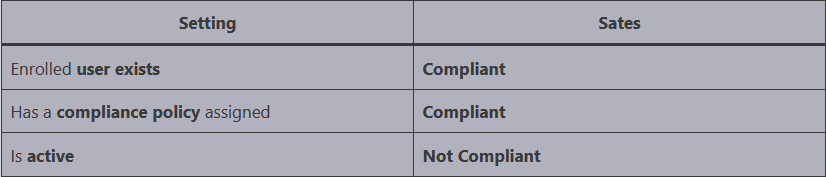
Common Fixes Being Tried
Many IT admins try different strategies. Here’s what’s working — and what might not:
🔁 Log in as the original (old) user and manually sync the device. ⚠️ May resolve the issue temporarily, but it often returns.
♻️ Re-enroll the device using the current user. This clears outdated associations and resets compliance evaluation.
🧩 Switch to device-based compliance policies rather than user-based — especially for BitLocker or security configuration settings.
💡 Pro Tip: Plan ahead for user transitions on shared or reassigned devices. Updating user associations proactively prevents compliance issues later.
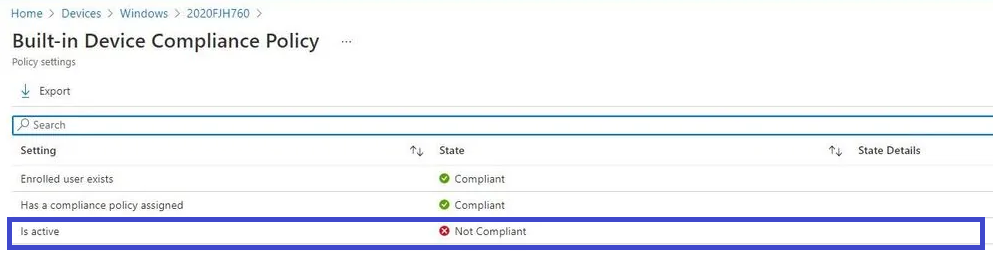
📊 Real-World Example
The compliance dashboard clearly shows “Not Compliant” under the former user, even though the same device is “Compliant” under the current primary user. This discrepancy often causes confusion during audits and policy reviews.
🧾 Conclusion
Microsoft Intune's user-centric approach to compliance is powerful, but it can backfire when devices change hands. By understanding how compliance is tied to user identity — and implementing proactive corrections — you can avoid false “Not Compliant” alerts and maintain the integrity of your compliance posture.
📚 More Information
Thank you!
🖥️ Ricardo Barbosa
📘 MCT Microsoft Certified Trainer | ☁️ Cloud Architect
🌐 Technology Director - https://altelix.com