
As hybrid work becomes the norm and employees increasingly use personal devices to access corporate data, protecting sensitive information across unmanaged endpoints has become more critical than ever. At the same time, the growing use of AI-powered applications — like ChatGPT, Copilot, and others — introduces a new dimension of data exposure risks.
To address these modern security challenges, Microsoft Edge for Business now brings native data protection features designed specifically for BYOD (Bring Your Own Device) scenarios and AI app interactions. This represents a major step forward in protecting organizational data across diverse environments.
The Dual Challenge: BYOD and AI Security Risks
Allowing employees to use personal devices increases flexibility and productivity — but also exposes organizations to real security vulnerabilities:
Lack of centralized security management on personal devices
Higher susceptibility to malware, phishing, and unauthorized access
Risk of data leaks when employees enter sensitive information into public AI tools
These risks are amplified in environments where AI is widely used but not tightly governed, making data governance and protection essential — even at the browser level.
What Microsoft Edge for Business Now Offers
Edge for Business now includes built-in protections tailored for unmanaged devices, providing enterprise-grade security controls without compromising user experience. Key capabilities include:
Automatic enforcement of compliance policies — even on personal PCs
Smart, context-aware protection for data accessed via the browser
Separation of personal and work browser sessions
AI-aware protections to reduce the risk of data exposure through public tools
Inline Protection Powered by Microsoft Purview
The integration with Microsoft Purview adds powerful real-time, inline data protection. When a user interacts with sensitive information, Edge can automatically apply security controls, such as:
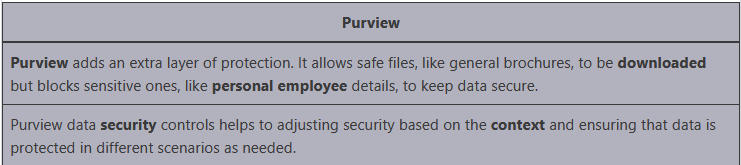
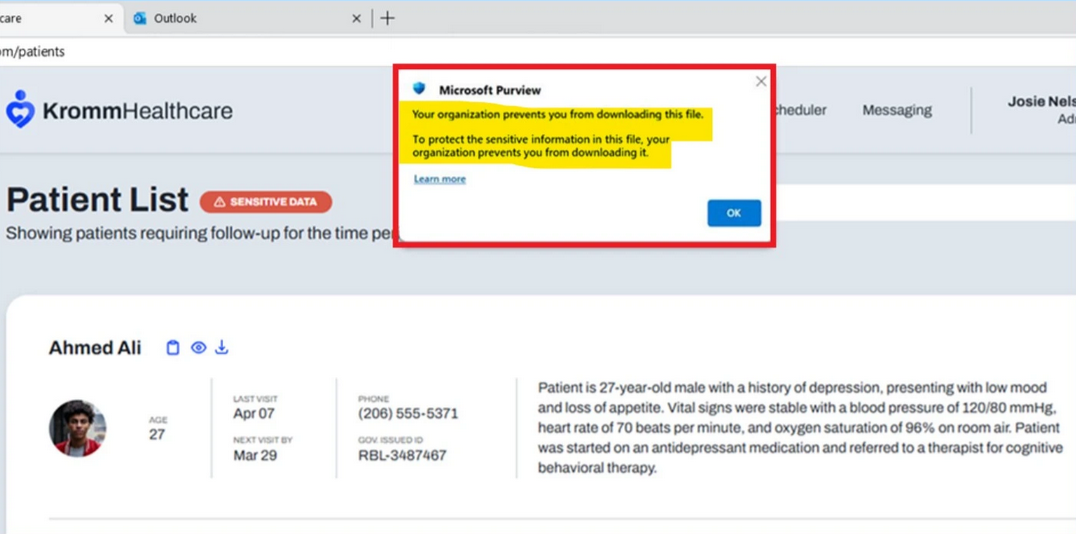
Blocking downloads of protected or confidential files on unmanaged devices
Disabling copy/paste, screen capture, or print actions
Enforcing encryption or watermarking when accessing sensitive content
This approach ensures users can safely access company data from personal devices — with no compromise on data protection.
Securing AI Interactions with Enterprise Policies
As organizations adopt tools like Microsoft Copilot, the same principles apply. Edge and Purview help enforce safe usage of AI by:
Preventing corporate data from being submitted to public AI models
Logging and monitoring interactions with AI tools
Restricting AI features based on user identity, device compliance, and access policy
This means security teams can maintain visibility and control over how AI is used — even when accessed from a personal device.
Final Thoughts
Microsoft Edge for Business is evolving into more than just a secure browser — it's becoming a key component of the modern security stack. Its built-in support for BYOD environments, coupled with AI-aware data protection and Purview integration, offers organizations a powerful solution for the security challenges of today.
Whether your workforce uses corporate laptops or personal smartphones, Edge helps ensure sensitive data stays protected — without getting in the way of productivity.
Intune enforces advanced data protection through real-time policy checks to ensure a secure and productive BYOD experience:
✅ Device Compliance Verification Intune checks if the personal device meets security requirements before granting access to work data.
✅ Secure Browser Enforcement Corporate resources can only be accessed via Microsoft Edge for Business, ensuring a trusted environment.
✅ Selective Download Permissions Users are allowed to download non-sensitive data, but access to sensitive content is restricted on personal or unmanaged devices.
BYOD Enablement with Policy Control Intune enables a secure BYOD (Bring Your Own Device) environment by enforcing policies on personal devices — protecting corporate data while allowing flexibility for employees to use their own hardware.
Availability This feature is available to Microsoft 365 E5 users, offering enterprise-grade security controls across devices and applications.
Purview’s New Inline Protection
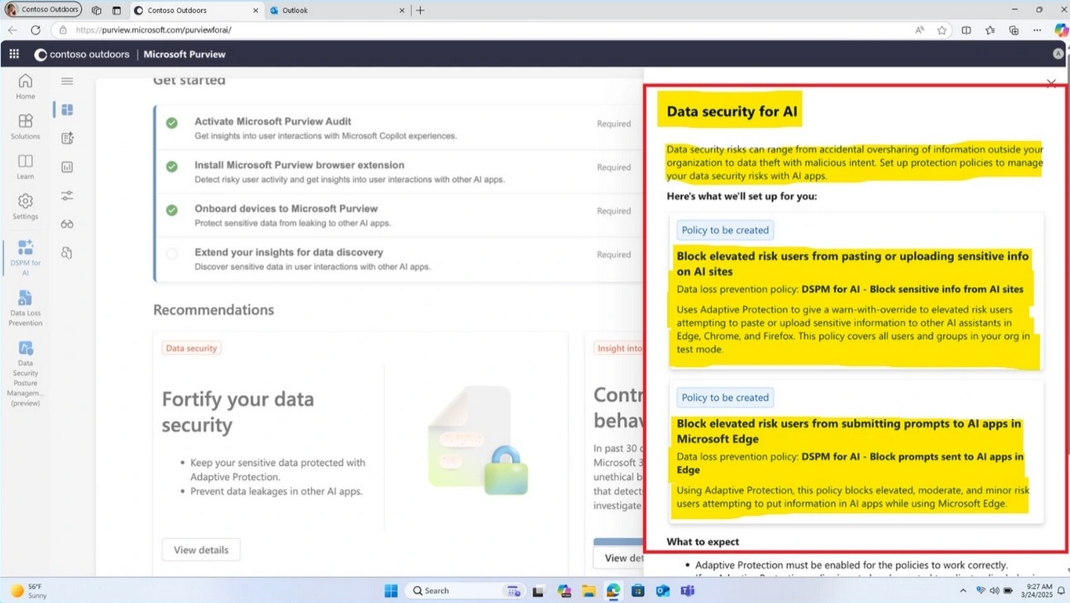
Purview’s new inline protection feature helps prevent users from sharing sensitive information with AI tools like ChatGPT, DeepSeek, Google Gemini, and Microsoft Copilot. In this case there is no problem to interact with AI applications. But it always prevent to share the sensitive data.
Purview’s inline DLP policies are applied to audit and block sensitive content in typed prompts.
It prevents users from submitting sensitive data, based on the risk-level of the user.
More Information
For additional guidance on configuring advanced data protection for BYOD and AI in Microsoft Edge for Business using Intune and Microsoft Purview, refer to the following resources on Microsoft Learn:
• Overview of Microsoft Intune https://learn.microsoft.com/en-us/mem/intune/fundamentals/what-is-intune
• Configure Microsoft Edge for Business
https://learn.microsoft.com/en-us/deployedge/microsoft-edge-for-business
• Manage BYOD with Microsoft Intune
https://learn.microsoft.com/en-us/mem/intune/enrollment/windows-enrollment-methods
• Data Loss Prevention with Microsoft Purview
• Use Microsoft Purview to apply inline protection
• AI and data security best practices in Microsoft 365
https://learn.microsoft.com/en-us/security/zero-trust/deploy/ai-security
These resources provide step-by-step instructions and detailed insights into setting up secure access, enforcing policies on personal devices, and managing AI interactions across endpoints.
Thank you!
🖥️ Ricardo Barbosa
📘 MCT Microsoft Certified Trainer | ☁️ Cloud Architect
🌐 Technology Director - https://altelix.com