
Custom Naming Templates for Android Enterprise Devices in Intune
Microsoft Intune continues to evolve, and one of its latest enhancements delivers a highly requested capability: Custom Naming Templates for Android Enterprise corporate-owned devices. This new feature empowers IT administrators to define automated, structured, and meaningful device names during the enrollment process — eliminating manual renaming and improving overall device traceability.
What Are Custom Naming Templates?
Custom Naming Templates allow organizations to generate device names dynamically by combining static text with intelligent variables such as:
{{SerialNumber}}
{{DeviceType}}
{{UserName}}
{{EnrollmentProfileName}}
This ensures consistency across devices, enhances reporting accuracy, and simplifies endpoint identification — especially in large-scale or multi-department environments.
Why This Feature Matters
Custom naming provides real-world value by:
📋 Standardizing device identification across the environment
🛠️ Automating naming conventions to reduce manual effort and human error
🔍 Improving inventory and compliance tracking
💡 Simplifying troubleshooting and support by making devices easily identifiable
Android Enterprise Enrollment in Intune
Microsoft Intune supports multiple Android Enterprise enrollment options, including:
Corporate-owned, fully managed devices
Corporate-owned dedicated devices (kiosk, single-purpose)
Work Profile (BYOD) — for personal devices with a secured work container
These flexible options allow IT teams to align device management with ownership models and use cases, while maintaining security and control.
Where to Configure the Custom Naming Template
This feature applies specifically to corporate-owned Android Enterprise devices and is configured directly within the enrollment profile.
Navigation path: Microsoft Intune Admin Center > Devices > Android > Android Enrollment > Corporate-owned dedicated devices > Enrollment profiles
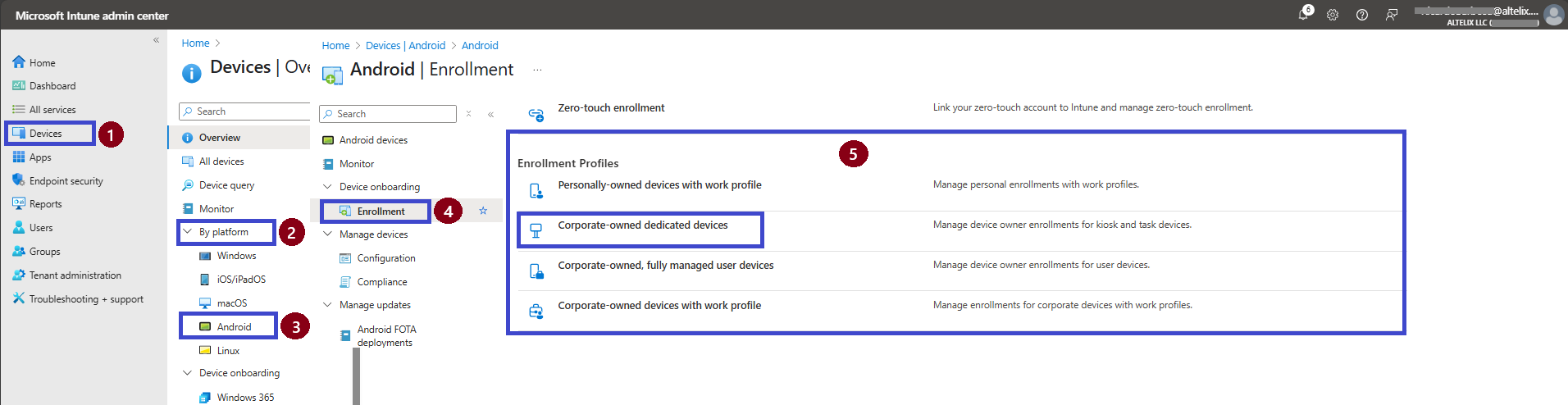
In this case, we will use the Corporate-owned dedicated devices option. Once selected, we’ll proceed with creating the enrollment profile as shown in the figure below."
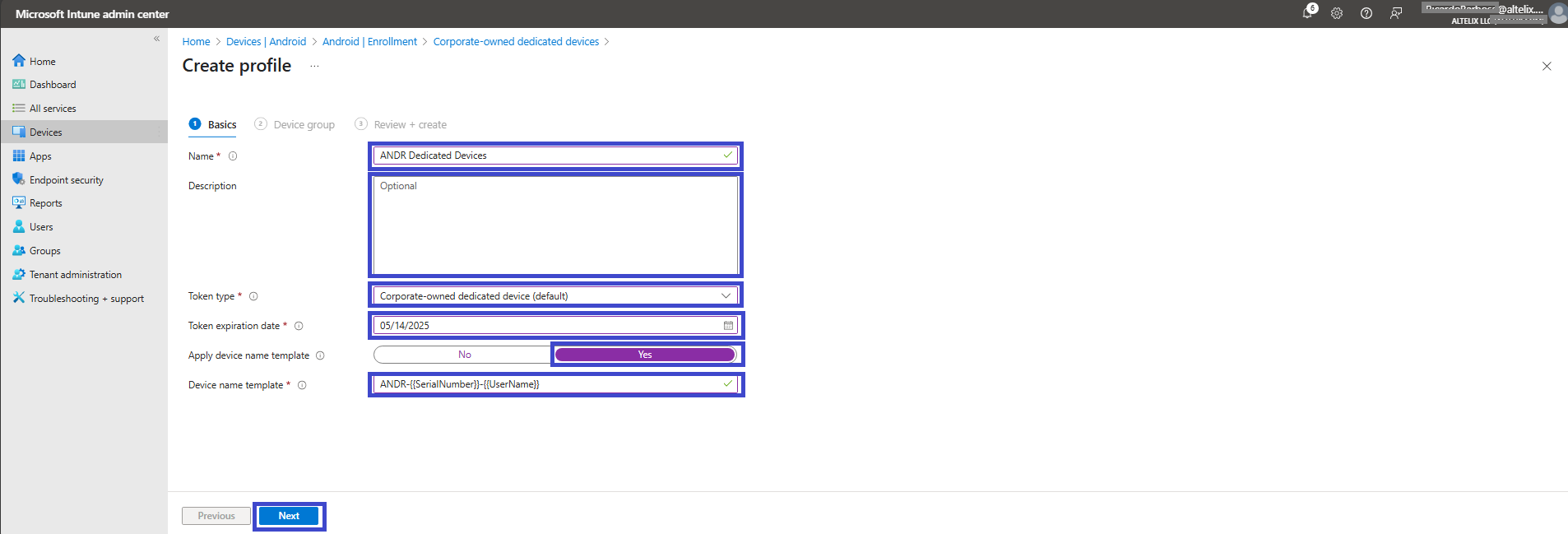
On the Basics tab, you’ll need to fill out the key information to configure the enrollment profile:
Profile Name: Provide a clear and descriptive name to easily identify the profile later.
Description: Enter a brief explanation of the profile’s purpose.
Token Type: Select Corporate-owned dedicated devices, which is the enrollment method we’ll use in this scenario.
Expiration Date: Choose a date for when the enrollment token will expire — after this date, the token will no longer be valid.
Apply Custom Name Template: Set this option to Yes to enable the custom naming feature.
Name Template: Finally, apply the desired naming convention using supported variables, as shown in the table below.
Click on Next
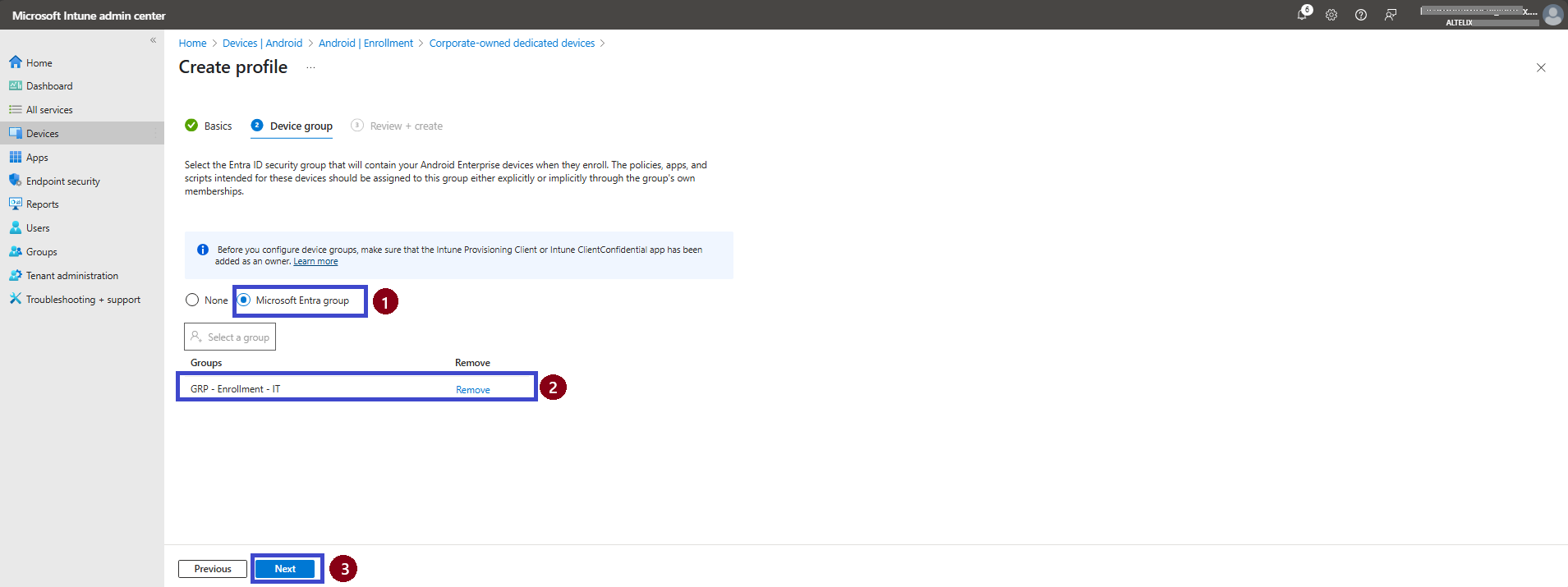
On the Device Group tab, you must select the group to which the enrollment profile will be applied. Choose a Microsoft Entra Group, select the appropriate group, and then click Next to proceed to the review page and complete the profile creation.
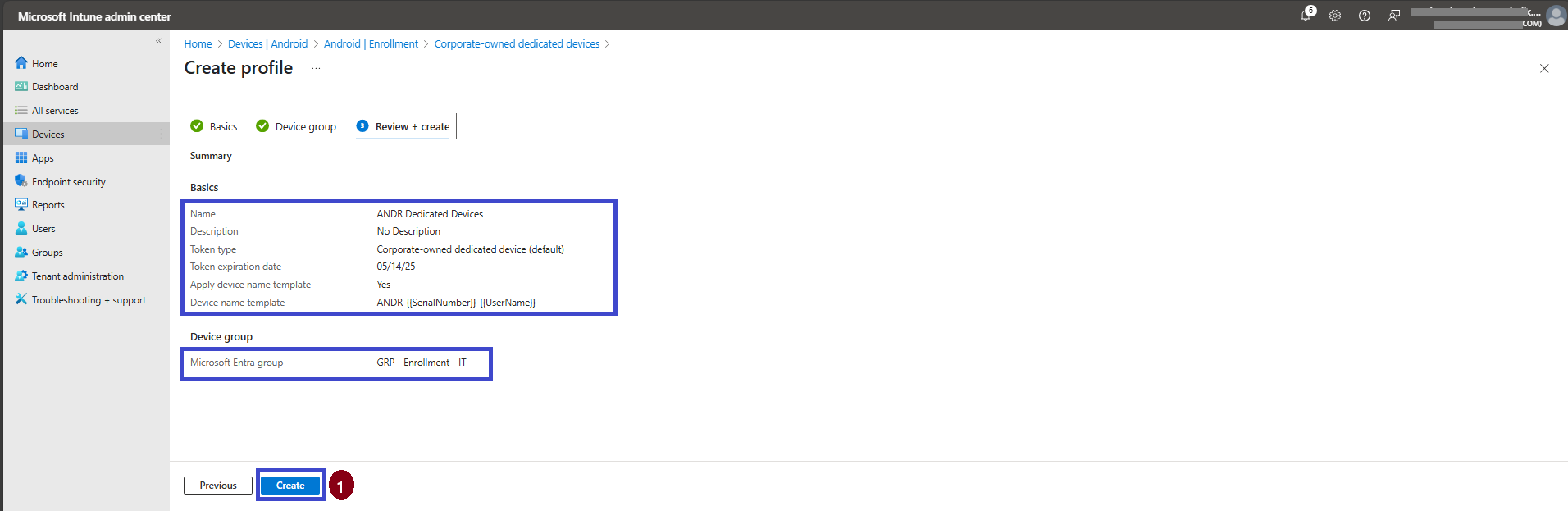
On the Review + Create tab, carefully review all the information. Make sure the correct group is selected, and then click Create to finalize and deploy the enrollment profile.
🧩 How It Works
During provisioning (e.g., QR code or Zero-touch), Intune uses the selected template to assign the device name automatically. By utilizing variables like serial numbers, usernames, and random strings, this process ensures consistent, descriptive, and easily traceable device names — enhancing management and operational efficiency.
🧾 Supported Variables
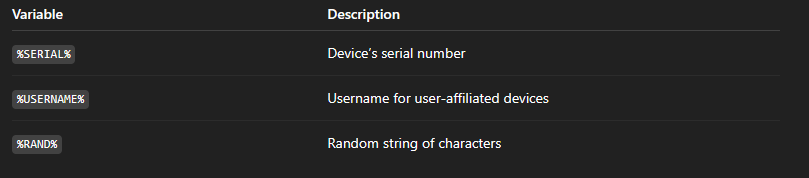
Once the enrollment profile is created, the result for the targeted group will follow the custom naming template applied.
For example:
✍️ Custom Naming Template:
🖥️ Resulting Device Name: ANDR-8J6W7QJ9-JSmith
This naming convention ensures consistency, improves device traceability, and simplifies identification across your organization — especially in environments with large-scale deployments or multi-user structures.
📘 Summary
This post introduced the Custom Naming Templates feature in Microsoft Intune for Android Enterprise corporate-owned devices. You learned:
What the feature does and why it matters
Where to configure it
How it works
Which variables are supported
As Microsoft continues to invest in modern endpoint management, enhancements like this help IT teams achieve greater automation, consistency, and efficiency in day-to-day operations.
📚 More Information
To deepen your understanding of configuring and managing Custom Naming Templates for Android Enterprise devices in Microsoft Intune, refer to the following official Microsoft resources:
Set up enrollment for Android Enterprise fully managed devices
Set up Intune enrollment for Android Enterprise dedicated devices
Set up Android Enterprise work profile for corporate-owned devices
Enroll Android Enterprise dedicated, fully managed, or corporate-owned with work profile devices
These resources provide detailed guidance for configuring, deploying, and verifying custom naming templates across managed Android Enterprise devices using Microsoft Intune.
Thank you!
🖥️ Ricardo Barbosa
📘 MCT Microsoft Certified Trainer | ☁️ Cloud Architect
🌐 Technology Director - https://altelix.com